
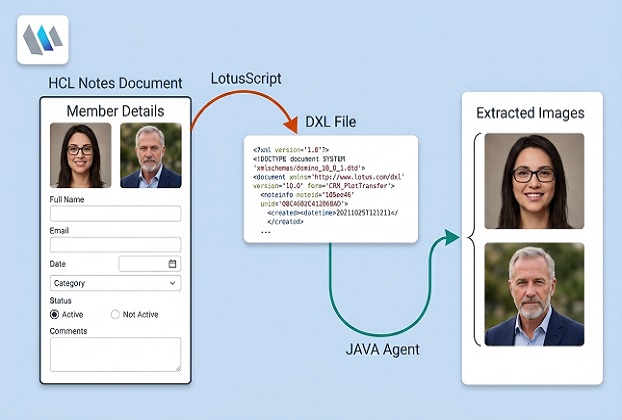
An actual development journey through LotusScript, Java, DXL, and the challenges of extracting images from Notes rich-text documents.
Introduction: A Small Requirement That Turned into a Technical Challenge
Sometimes, a seemingly straightforward requirement in an established enterprise application turns out to be more complicated than expected.
In our HCL Notes/Domino environment, we needed to extract images embedded inside Notes documents and save them as separate image files. The purpose was practical: make those images available outside Notes for further processing, reporting, or other application requirements.
At first glance, this might sound like a simple file-extraction task. Notes already provides classes for working with documents, rich-text fields, and embedded objects. Surely there would be a straightforward method to retrieve an image and save it to disk?
The difficulty was that an image displayed inside a Notes rich-text field is not necessarily stored in the same way as a conventional file attachment. The distinction matters because a solution designed for attachments does not automatically solve the problem of extracting pictures embedded directly in rich text.
What followed was a series of experiments, unexpected limitations, and changes in approach. The eventual solution combined LotusScript, Java, and Domino XML Language (DXL) to extract embedded JPEG and GIF images into separate files.
This article documents that journey, explains the technical decisions behind the final approach, and considers how newer HCL Domino capabilities may offer alternatives today.
Understanding the problem: Embedded images are not ordinary attachments
A Notes document can contain several kinds of content, including text, formatting, pictures, file attachments, and embedded objects. Although some of these items may look similar to an end user, their underlying representations and the APIs used to access them can be quite different.
For example, the NotesEmbeddedObject.ExtractFile method is useful when dealing with supported file attachments. It is not a universal method for extracting every picture displayed inside a rich-text field.
That distinction became the starting point of our investigation.
We were interested specifically in images embedded within rich text—not ordinary attachments. We needed a practical way to identify those pictures, extract their binary data, and save them as independent files without relying on users to open individual documents and save pictures manually.
The first major decision: Use DXL as the bridge
DXL, or Domino XML Language, provides an XML representation of Domino data. Through the NotesDXLExporter class, Notes can export a document into this representation.
This offered a useful way forward.
Instead of trying to extract every picture directly from the Notes document through a single high-level method, we could export the document to DXL and examine how the embedded image data was represented there.
The exported XML can contain image elements such as <jpeg> and <gif>, with their image data represented as Base64-encoded text. Base64 is a text-based way of representing binary data, making it possible to carry image bytes inside an XML document.
The process therefore became:
- Export the Notes document to DXL.
- Save the exported XML to a temporary file.
- Read the XML and identify supported embedded-image elements.
- Decode their Base64 content back into binary image data.
- Save each image as a separate file.
This approach gave us direct access to the image data represented in the exported XML, while allowing us to keep the surrounding Notes application logic in LotusScript.
Why combine LotusScript and Java?
LotusScript was already responsible for working with Notes documents and invoking the export process. Java provided a convenient environment for reading the resulting XML file, processing its text, decoding Base64 data, and writing binary files.
Rather than moving the entire operation into a single language, we used each where it was useful.
The LotusScript function performs the Notes-specific work: it obtains the document, exports it through NotesDXLExporter, and supplies the Java agent with the necessary parameters.
The Java agent then processes the exported file and writes the extracted images to disk.
The two components communicate through Notes session environment variables. These variables carry the temporary DXL file path, the output directory, and the filename prefix. The Java agent reads those values through Session.getEnvironmentString().
This is not a stream-based parameter-passing mechanism. The XML file is the data being processed; the environment variables simply tell the Java agent where to find it and how to name its output.
The challenges that made the solution more involved
The first workable approach was not the end of the story. Several practical issues had to be addressed before the extraction process became useful in our real application.
1. Memory consumption and large documents
A document’s exported DXL can be considerably larger than the visible text in the Notes document, particularly when it contains rich text and embedded media.
Loading a large amount of XML into memory and then processing it can put unnecessary pressure on the Java heap or the Notes client. Large documents may also expose limitations that are not apparent when testing with a few small examples.
Our final processing stage reads the XML from a file in character buffers rather than loading the entire XML file into a Java string. This keeps the Java-side reading process bounded by the buffer size rather than the size of the complete exported file.
There is an important qualification: the supplied LotusScript exporter still obtains the exported DXL as a string before writing it to disk. Therefore, the complete workflow is not entirely streaming or memory-independent. The file-based Java reader reduces memory use during extraction, but it does not eliminate the memory cost of producing the DXL string.
That distinction is important when evaluating the approach for particularly large documents.
2. Image data does not always align neatly with text lines
An XML document is structured markup, but the Base64 image data inside it may span many lines. Even an opening tag can occasionally be split across lines.
A parser that assumes every image begins and ends on a particular line can miss valid images or decode the wrong text. The processing logic therefore has to recognise image boundaries and distinguish the actual Base64 content from the surrounding XML tags.
Our implementation tracks the current field name and the image-processing state while reading the exported file. It recognises JPEG and GIF elements, handles common opening-tag layouts, and decodes the content as it encounters it.
This is one reason the solution is more than simply searching the XML for a filename or replacing a tag.
3. More than one image can have the same apparent identity
Another practical issue appeared when different Notes documents were associated with the same registration number or other filename prefix.
If every image were saved using a predictable name such as MemberRegNumber_FieldName_1.jpeg, a later document could overwrite an existing file or collide with an earlier extraction.
The final implementation addresses this by checking whether the proposed output filename already exists. If it does, the image counter is incremented until an available filename is found.
The helper method getAvailableImageFile() encapsulates this decision. It returns both the selected filename and the counter value used, allowing the caller to continue numbering from the chosen value.
This is a small piece of code, but it solves a significant problem in repeated, real-world extraction jobs.
The check is designed to avoid collisions with files that already exist. It is not, by itself, a guarantee against simultaneous extraction jobs choosing the same filename at exactly the same time.
4. Different embedded-image representations
During the investigation, we also encountered the distinction between ordinary JPEG/GIF elements and native Notes bitmap representations.
The final solution described here handles the JPEG and GIF elements it recognises. Native <notesbitmap> content was not successfully supported by the implementation we finalised, so that unfinished branch has deliberately been excluded from the code.
This is an important limitation to state openly. A picture that appears correctly inside a Notes document is not guaranteed to be extractable by this particular implementation.
HCL’s DXL exporter has a ConvertNotesBitmapsToGIF property that can convert pasted Notes bitmaps to GIF representations when enabled. That is a potentially useful avenue for further work, but it was not part of the verified extraction workflow presented here. Enabling that property and validating the resulting output would be a separate enhancement.
The final architecture
The final implementation is divided into three practical parts.
Part 1 — LotusScript: Accepts a Notes document, exports it to DXL, writes the temporary XML file, sets the session environment variables, and runs the Java agent.
Part 2 — Java agent: Reads the DXL file, identifies supported JPEG/GIF elements, decodes the image data, and writes the resulting binary files.
Part 3 — Filename management: Checks for existing files and increments the image counter when necessary to avoid overwriting images extracted earlier.
The usage example at the end demonstrates how the calling code can obtain a document from db.UnprocessedDocuments and pass it to the LotusScript function.
The implementation is intentionally presented as practical application code, not as a claim that every possible Notes image representation or every possible XML layout has been solved.
Complete LotusScript function – Image extraction preparation and Java agent invocation:
Function Extract_EmbeddedImages( _
    Doc As NotesDocument, _
    OutputPath As String, _
    OutPutFilePrefix As String) As Boolean

    On Error GoTo ErrHandler

    Dim session As New NotesSession
    Dim db As NotesDatabase
    Dim dxlExporter As NotesDXLExporter
    Dim javaAgent As NotesAgent
    Dim dxlFile As String
    Dim dxl As String
    Dim fileNum As Integer
    Dim fso As Variant

    Extract_EmbeddedImages = False

    If Doc Is Nothing Then Exit Function

    If Right$(OutputPath, 1) <> "\" Then
        OutputPath = OutputPath & "\"
    End If

    Set db = session.CurrentDatabase
    Set javaAgent = db.GetAgent("ExtractImageAgent3")

    If javaAgent Is Nothing Then
        Error 1001, "Java agent ExtractImageAgent3 was not found."
    End If

    Set dxlExporter = session.CreateDXLExporter

    dxl = dxlExporter.Export(Doc)

    dxlFile = OutputPath & OutPutFilePrefix & ".xml"

    fileNum = FreeFile()
    Open dxlFile For Output As fileNum
    Print #fileNum, dxl
    Close fileNum

    Call session.SetEnvironmentVar("dxlFilePath", dxlFile)
    Call session.SetEnvironmentVar("FileNamePrefix", OutPutFilePrefix)
    Call session.SetEnvironmentVar("OutputPath", OutputPath)

    If javaAgent.Run() = 0 Then
        Extract_EmbeddedImages = True
    End If

Cleanup:
    On Error Resume Next

    If fileNum <> 0 Then Close fileNum

    Set fso = CreateObject("Scripting.FileSystemObject")

    If fso.FileExists(dxlFile) Then
        fso.DeleteFile dxlFile, True
    End If

    On Error GoTo 0
    Exit Function

ErrHandler:
    MessageBox "Extract_EmbeddedImages failed: " & _
        Error$ & " (line " & CStr(Erl()) & ")"

    Resume Cleanup

End Function
Usage example in LotusScript – Our first step towrads (selected) Notes documents iteration and calling above function for each document:
Dim session As New NotesSession
Dim db As NotesDatabase
Dim collection As NotesDocumentCollection
Dim doc As NotesDocument

Dim OutputPath As String
Dim OutPutFilePrefix As String

Set db = session.CurrentDatabase
Set collection = db.UnprocessedDocuments
Set doc = collection.GetFirstDocument()

OutputPath = "D:\Temp\Media\ProjectName\Payments\"    ''Specify your image output path.
OutPutFilePrefix = "MemberRegNumber"    ''specify your own custom filename prefix to identify whom the image belongs to.

If Not (doc Is Nothing) Then
    If Extract_EmbeddedImages( _
        doc, OutputPath, OutPutFilePrefix) Then

        MessageBox "Extraction agent completed."
    Else
        MessageBox "Image extraction failed."
    End If
End If
Java Agent – Image extraction from DXL, the real challenging part: The code covers JPG and GIF type images because that was enough for us. If you find any other type of image you may have to modify the code accordingly.
import lotus.domino.*;

import java.io.*;
import java.nio.charset.StandardCharsets;
import java.util.Base64;
import java.util.regex.Matcher;
import java.util.regex.Pattern;

public class JavaAgent extends AgentBase {

    public void NotesMain() {

        String dxlFilePath = null;
        String outputPath = null;
        String fileNamePrefix = null;

        try {
            Session session = getSession();

            dxlFilePath =
                session.getEnvironmentString("dxlFilePath");

            fileNamePrefix =
                session.getEnvironmentString("FileNamePrefix");

            outputPath =
                session.getEnvironmentString("OutputPath");

            File xmlFile = new File(dxlFilePath);

            if (!xmlFile.isFile()) {
                throw new IOException(
                    "DXL file not found: " + dxlFilePath);
            }

            if (!outputPath.endsWith(File.separator)) {
                outputPath += File.separator;
            }

            extractImages(
                xmlFile, outputPath, fileNamePrefix);

        } catch (Exception e) {
            e.printStackTrace();
        }
    }

    private void extractImages(
        File xmlFile,
        String outputPath,
        String fileNamePrefix) throws IOException {

        Pattern fieldPattern =
            Pattern.compile("<item\\s+name='([^']+)'");

        Pattern imageStartPattern =
            Pattern.compile("<(jpeg|gif)(?:\\s[^>]*)?>");

        Base64.Decoder decoder = Base64.getMimeDecoder();

        String currentFieldName = "";
        String pendingImageType = null;
        String imageType = null;

        int imageCount = 0;

        boolean grabbingImage = false;

        FileOutputStream imageOutput = null;
        BufferedReader reader = null;

        StringBuilder pendingTag = new StringBuilder();

        try {
            reader = new BufferedReader(
                new InputStreamReader(
                    new FileInputStream(xmlFile),
                    StandardCharsets.UTF_8));

            String line;

            while ((line = reader.readLine()) != null) {

                Matcher fieldMatcher =
                    fieldPattern.matcher(line);

                if (fieldMatcher.find()) {
                    currentFieldName =
                        fieldMatcher.group(1).trim();
                }

                if (!grabbingImage) {

                    if (pendingImageType != null) {

                        pendingTag.append(line);

                        int tagEnd = pendingTag.indexOf(">");

                        if (tagEnd < 0) {
                            continue;
                        }

                        imageType = pendingImageType;
                        pendingImageType = null;

                        String afterTag =
                            pendingTag.substring(tagEnd + 1);

                        pendingTag.setLength(0);

                        imageCount++;

                        AvailableImageFile available =
                            getAvailableImageFile(
                                outputPath,
                                fileNamePrefix,
                                currentFieldName,
                                imageCount,
                                imageType.equals("gif")
                                    ? ".gif" : ".jpeg");

                        imageCount = available.imageCount;

                        imageOutput =
                            new FileOutputStream(available.imgFile);

                        grabbingImage = true;

                        String closeTag =
                            "</" + imageType + ">";

                        int closeAt = afterTag.indexOf(closeTag);

                        if (closeAt >= 0) {
                            writeBase64(
                                decoder, imageOutput,
                                afterTag.substring(0, closeAt));

                            imageOutput.close();
                            imageOutput = null;
                            grabbingImage = false;
                        } else {
                            writeBase64(
                                decoder, imageOutput, afterTag);
                        }

                        continue;
                    }

                    Matcher startMatcher =
                        imageStartPattern.matcher(line);

                    if (startMatcher.find()) {

                        imageType = startMatcher.group(1);

                        imageCount++;

                        AvailableImageFile available =
                            getAvailableImageFile(
                                outputPath,
                                fileNamePrefix,
                                currentFieldName,
                                imageCount,
                                imageType.equals("gif")
                                    ? ".gif" : ".jpeg");

                        imageCount = available.imageCount;

                        imageOutput =
                            new FileOutputStream(available.imgFile);

                        grabbingImage = true;

                        String afterTag =
                            line.substring(startMatcher.end());

                        String closeTag =
                            "</" + imageType + ">";

                        int closeAt = afterTag.indexOf(closeTag);

                        if (closeAt >= 0) {
                            writeBase64(
                                decoder, imageOutput,
                                afterTag.substring(0, closeAt));

                            imageOutput.close();
                            imageOutput = null;
                            grabbingImage = false;
                        } else {
                            writeBase64(
                                decoder, imageOutput, afterTag);
                        }

                        continue;
                    }

                    if (line.contains("<jpeg") ||
                        line.contains("<gif")) {

                        int jpegAt = line.indexOf("<jpeg");
                        int gifAt = line.indexOf("<gif");

                        if (jpegAt >= 0 &&
                            (gifAt < 0 || jpegAt < gifAt)) {
                            pendingImageType = "jpeg";
                            pendingTag.append(
                                line.substring(jpegAt));
                        } else if (gifAt >= 0) {
                            pendingImageType = "gif";
                            pendingTag.append(
                                line.substring(gifAt));
                        }
                    }

                } else {

                    String closeTag =
                        "</" + imageType + ">";

                    int closeAt = line.indexOf(closeTag);

                    if (closeAt >= 0) {

                        writeBase64(
                            decoder, imageOutput,
                            line.substring(0, closeAt));

                        imageOutput.close();
                        imageOutput = null;
                        grabbingImage = false;

                    } else {
                        writeBase64(
                            decoder, imageOutput, line);
                    }
                }
            }

        } finally {

            if (imageOutput != null) {
                try {
                    imageOutput.close();
                } catch (IOException ignored) {}
            }

            if (reader != null) {
                reader.close();
            }
        }
    }

    private void writeBase64(
        Base64.Decoder decoder,
        OutputStream output,
        String content) throws IOException {

        String clean = content.trim();

        if (clean.isEmpty()) {
            return;
        }

        try {
            output.write(decoder.decode(clean));
        } catch (IllegalArgumentException e) {
            // Malformed or incomplete Base64 line.
            // Log this error in production rather than silently
            // treating the extraction as successful.
            throw new IOException(
                "Invalid Base64 image content.", e);
        }
    }

    private static class AvailableImageFile {

        String imgFile;
        int imageCount;

        AvailableImageFile(String imgFile, int imageCount) {
            this.imgFile = imgFile;
            this.imageCount = imageCount;
        }
    }

    private AvailableImageFile getAvailableImageFile(
        String outputPath,
        String fileNamePrefix,
        String currentFieldName,
        int imageCount,
        String imgExt) {

        String imgFile;

        do {
            imgFile = outputPath
                + fileNamePrefix + "_"
                + currentFieldName + "_"
                + imageCount + imgExt;

            if (new File(imgFile).exists()) {
                imageCount++;
            } else {
                break;
            }

        } while (true);

        return new AvailableImageFile(imgFile, imageCount);
    }
}
This solution follows sound software engineering principles, emphasizing low coupling, high cohesion, abstraction, and reusability, enabling developers to integrate it into their own applications with minimal modification but easy customization.
What about newer HCL Notes/Domino releases?
A technical article about a Notes solution should not imply that the platform has stood still since the solution was developed.
Our original implementation was developed and finalised in a Notes 10 environment. Since then, HCL has continued to enhance Domino and its surrounding development ecosystem. It is worth asking whether a newer API now provides a simpler route to the same result.
Our research identified two relevant capabilities in the modern Domino REST API documentation.
First, HCL documents the retrieval of embedded rich-text images through its attachments endpoint. When rich text is returned as HTML, an embedded image can be represented by a URL containing OpenElement and FieldElemFormat=gif. The documented approach uses a Base64-encoded version of that image URL as the attachment name when retrieving the image. This is a genuine alternative worth investigating for suitable REST API deployments. HCL Domino REST API: What’s new
Second, starting with Domino REST API 1.1.5, applicable endpoints can return raw rich-text composite data through the richTextAs=compositedata parameter. The result is a Base64-encoded representation of the composite data structures. This provides lower-level access to the rich-text representation, but it should not be confused with a ready-made method that returns every embedded image as a separate file. HCL Domino REST API: Rich Text
The current documentation also lists Domino REST API 1.1.8, which adds an endpoint for discovering attachment names and paths, including embedded files in rich-text fields on mail documents. HCL Domino REST API 1.1.8 release notes
These are important developments, but there are two points to keep in mind.
First, a REST API-based approach requires a suitable API deployment, configuration, and access permissions. It is not automatically a drop-in replacement for a Java agent running within a Notes application.
Second, we have researched these newer capabilities, but have not independently implemented and tested them against the full set of cases handled—or not handled—by our existing solution. We therefore cannot claim that either newer route is simpler or more reliable for every scenario.
For developers working in a modern Domino environment, these capabilities deserve investigation before adopting the older DXL-based approach for a new project. For developers maintaining established Notes applications, the LotusScript/Java solution remains a useful reference for understanding and processing the image data exposed by DXL.
Final thoughts
The most valuable lesson from this exercise is not that one programming language or one API is always better than another. It is that seemingly simple tasks in a mature application platform can require a clear understanding of how the underlying data is represented.
DXL gave us a way to inspect the document representation. LotusScript handled the Notes-specific export and agent invocation. Java provided the file-processing and Base64-decoding logic. And a seemingly minor filename collision became an important part of making the result safe to use repeatedly.
The solution was developed through real experimentation, not by assuming that the first available method would cover every case. Its limitations are part of that story, too.
If you are working with embedded images in HCL Notes documents, the approach we took can serve as a starting point—but test it against your own document types, image formats, and file sizes. And if your environment already supports the modern Domino REST API, investigate its rich-text image retrieval capabilities before deciding which architecture best fits your requirements.
Frequently Asked Questions
Can NotesEmbeddedObject.ExtractFile extract images embedded in a rich-text field?
Not reliably. The ExtractFile method is meant for supported file attachments. A picture displayed inside a rich-text field is not necessarily stored as an attachment, which is why we exported the document to DXL and read the image data directly from there.
Why use DXL to extract embedded images from Notes documents?
DXL gives you an XML representation of the document, including image elements such as jpeg and gif whose data is Base64-encoded. Once you can read that data, you can decode it back into binary and save it as an ordinary image file. This is the most feasible approach we found so far, you may have to endeavor to figure out alternate solution.
Which image formats does this solution support?
As you may see in the Java agent, It handles the JPEG and GIF elements, it recognizes in the exported DXL. Native notesbitmap content is not supported by this implementation, so a picture that displays correctly in Notes may still not be extracted.
Why are both LotusScript and Java used?
LotusScript does the Notes-specific work: getting the document, exporting it with NotesDXLExporter and starting the Java agent. Java handles reading the XML file, decoding the Base64 data and writing the binary image files. We didn’t find Notes to provide any mechanism (as we know) to accomplish this particular job.
How does the LotusScript code pass information to the Java agent?
Through Notes session environment variables. They carry the temporary DXL file path, the output directory and the filename prefix, and the Java agent reads them with Session.getEnvironmentString().
Does this approach work for very large documents?
Only partly. The Java agent reads the DXL file in character buffers, so its memory use stays bounded. However, the LotusScript exporter still builds the DXL as a string before writing it to disk, so very large documents can still put pressure on memory.
How are duplicate image filenames handled?
The helper method getAvailableImageFile() checks whether the proposed filename already exists and keeps incrementing the image counter until it finds a free name. This protects against overwriting earlier extractions, but it does not guarantee safety if two extraction jobs run at exactly the same time.
Can the Domino REST API extract embedded rich-text images instead?
HCL documents a way to retrieve embedded rich-text images through the attachments endpoint, and newer versions add further rich-text capabilities. It needs a suitable Domino REST API deployment and permissions, and we have not tested it against all the cases covered here, so it is worth evaluating rather than assuming it is a drop-in replacement.
What is the ConvertNotesBitmapsToGIF property?
It is a property of the DXL exporter that can convert pasted Notes bitmaps to GIF representations when enabled. It may be a useful route for supporting notesbitmap images, but it was not part of the verified workflow in this article.