Introduction: The Shift from Assistant to Agent
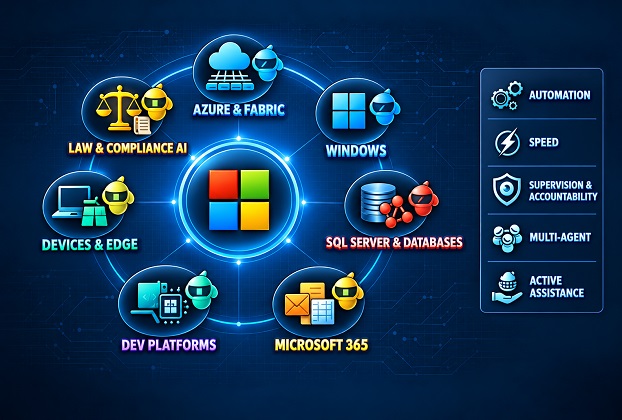
Artificial Intelligence has moved beyond novelty. By late 2026, Microsoft’s strategy is clear: embed generative, agentic, and embedded AI into every layer of its ecosystem. The company is transitioning from “Copilot as assistant”, a productivity booster, to “Copilot as agent”, capable of autonomous orchestration across cloud, operating systems, databases, productivity suites, and edge devices.
This roadmap is not just about smarter tools. It is about AI becoming the operational backbone of enterprises and everyday users alike. With unified data foundations like Microsoft Fabric and Azure HorizonDB, Microsoft is laying the groundwork for compliance-ready, multi-agent ecosystems that can scale globally.
Before going layer by layer, it helps to be clear about the vocabulary, because “AI” gets used loosely and the differences matter for anyone planning a budget or a project.
- Generative AI produces content (text, code, images) when you ask for it.
- An assistant sits beside you, answers questions, and waits for the next prompt. Early Copilot was this.
- An agent is given a goal, breaks it into steps, uses tools and data to carry those steps out, checks its own progress, and comes back with a result. You supervise instead of driving.
- A multi-agent system is several agents, often built by different teams, handing work to each other.
The jump from assistant to agent sounds small, but it changes who is responsible for what. An assistant can be wrong and you simply ignore it. An agent can be wrong and already have sent the email, changed the record, or restarted the service. That single difference explains most of what Microsoft is building around the agents themselves: identity, permissions, audit trails and governance. We will come back to that, because it is where IT professionals will spend most of their time.
One note on how to read this article. Some of what follows is shipping today, some is in preview, and some is a reasonable projection of where the products are heading. I have tried to mark which is which. Treat the 2027 items as direction, not as a release calendar.
Azure Cloud and Fabric
2026: Azure has become the epicenter of Microsoft’s AI ambitions. Fabric now unifies analytics, governance, and databases into a single AI-ready backbone. Tools like the Rayfin SDK/CLI and Azure HorizonDB (a PostgreSQL variant optimized for AI workloads) are enabling developers to build agentic applications at scale. Azure Machine Learning integrates multi-model orchestration, supporting models from several vendors alongside custom enterprise models.
2027: Microsoft plans to deepen multi-agent orchestration within Fabric. Agents will share organizational context seamlessly, enabling compliance-aware pipelines. Enterprises will gain governed AI workflows with built-in regulatory adherence, while SMBs will access simplified “Copilot Cloud” bundles. This democratizes AI adoption across scales.
What these pieces actually are
If you have not touched them yet, here is a plain-language reading of the names above.
Microsoft Fabric is Microsoft’s all-in-one data platform. Instead of stitching together a data lake, a warehouse, pipelines and reporting from separate services, Fabric puts them on one storage layer (OneLake) with one security and governance model. For AI, that matters because an agent is only as good as the data it can reach. One catalog and one permission model means fewer places where an agent can see something it should not.
Rayfin is an open-source SDK and CLI, announced at Build 2026 and still in public preview. You describe your data model in TypeScript using decorators, and the tooling generates the database schema, permissions and API, then deploys the backend onto Fabric with a single command. The attraction is for people building apps, and for coding agents that need a predictable, declarative target to generate against. Because it is preview, do not plan a production system around it yet. Do try it in a sandbox so you understand the model.
Azure HorizonDB is Microsoft’s PostgreSQL-compatible database service aimed at AI-heavy workloads. If your team already runs PostgreSQL, it is worth watching as a managed option with vector capabilities close to the data.
Multi-model orchestration means you are not locked to one model vendor. Different tasks suit different models, and Azure’s AI services let you route between them, including models from outside Microsoft. For enterprises this is a practical hedge: model quality and pricing change every few months, and you do not want to rewrite your applications each time.
Why Fabric is central to the agent story
Most failed AI pilots I hear about fail on data, not on the model. The data is scattered, duplicated, badly labelled, or locked behind permissions nobody remembers setting. Fabric’s value for agents is that it tries to fix that foundation: one copy of the data, shared definitions of business terms, lineage you can trace, and sensitivity labels that follow the data into the AI layer. When Microsoft talks about agents sharing “organizational context”, this is the mechanism it has in mind.
A practical caution
A unified platform is convenient, but it also concentrates risk. If one agent identity has broad access to the whole lakehouse, a single mistake or a single compromised credential reaches everything. The sensible pattern is the same one we have always used for service accounts: narrow scopes, separate identities per agent, and no shared secrets.
Windows OS
2026: Windows 11 integrates Copilot system-wide. AI is embedded into File Explorer, Settings, and Edge, offering contextual help and workflow automation. Enterprise editions include policy-controlled AI agents, ensuring IT governance and compliance.
2027: Microsoft envisions agentic OS layers. AI agents will autonomously manage updates, security patches, and resource optimization. For individuals, this means a “personal OS copilot” that anticipates needs. For enterprises, it means AI-driven endpoint management, reducing IT overhead and enhancing resilience.
About the “Windows 12” question
You will see “Windows 12” in many articles, and I used to expect it too. As of this writing Microsoft has not officially announced a product by that name. The company keeps delivering major changes as updates to Windows 11, and the agentic features discussed here are arriving that way. Whether the next big step carries a new number or not is, for planning purposes, less important than the direction: the operating system is moving from a place where you launch apps to a place where agents act on your behalf.
What “agentic Windows” looks like in practice
Three ideas are worth understanding.
- Copilot+ PCs and the NPU. These machines carry a neural processing unit, which runs AI models locally with little power draw. Local processing means lower latency and, for sensitive work, data that never leaves the device.
- Agents that act on the desktop. Features such as Copilot Actions let an AI agent perform tasks inside applications and files on your behalf, within a contained workspace and with permissions you can review.
- A standard way for agents to use tools. Windows is adopting the Model Context Protocol (MCP), an open standard that lets an agent discover and call tools exposed by apps and services. If you write Windows software, exposing your app’s functions to agents through a protocol like this is likely to become as normal as exposing a command-line interface was.
What this means for IT administrators
An agent that can click through applications is, from a security point of view, a new kind of user. The questions to settle before you switch it on are the old ones in new clothes. What can it read? What can it change? Is every action logged somewhere your security team can see? Can you disable it centrally with Group Policy or Intune if something goes wrong? Microsoft’s emphasis on policy-controlled agents in enterprise editions suggests it knows these are the questions customers will ask first.
For endpoint management, the 2027 vision of agents handling patching and resource tuning is attractive, but I would expect a long period where the agent recommends and a human approves. Fully autonomous patching on a fleet of line-of-business machines is a brave step for any organisation with legacy applications.
SQL Server and Databases
2026: SQL Server 2025 and Azure SQL embed vector search and AI-ready indexing, enabling retrieval-augmented generation (RAG) directly from enterprise data. Synapse Analytics and Fabric Data Warehouse unify structured and unstructured data, making AI workloads seamless.
2027: Expect AI-native query optimization and agentic database tuning. AI will autonomously manage indexing, caching, and workload balancing. Enterprises will benefit from self-healing databases with anomaly detection, reducing downtime and manual intervention.
Vector search without leaving T-SQL
For anyone who works with SQL Server, the most concrete change is that vectors are now a native data type. A vector is just a list of numbers, an “embedding”, produced by an AI model to represent the meaning of a piece of text. Two pieces of text with similar meaning get vectors that sit close together. Searching by meaning, rather than by keyword, becomes a distance calculation.
A simplified example of the idea:
-- A table that stores text alongside its embedding
CREATE TABLE dbo.KnowledgeBase
(
    Id        INT IDENTITY PRIMARY KEY,
    Title     NVARCHAR(200),
    Body      NVARCHAR(MAX),
    Embedding VECTOR(1536)   -- size depends on the embedding model
);

-- Find the 5 entries closest in meaning to a question
SELECT TOP (5) Id, Title,
       VECTOR_DISTANCE('cosine', Embedding, @QuestionEmbedding) AS Distance
FROM dbo.KnowledgeBase
ORDER BY Distance;
The application generates an embedding for the user’s question, runs a query like this, and passes the top matches to a language model as context. That is RAG in a nutshell: the model answers using your data instead of guessing. The benefit of doing it inside the database is that your existing security, backups, high availability and auditing still apply. You are not copying sensitive rows into a separate vector store that needs its own protection.
RAG versus fine-tuning, briefly
Readers new to this often ask whether they should train a model on their data. For most business cases the answer is no. RAG is cheaper, easier to keep current (you update rows, not a model), and easier to audit, because you can see exactly which records the answer was built from. Fine-tuning has its place, mostly for tone, format or narrow specialised tasks.
The “self-healing database” idea, with a DBA’s eye
Automatic tuning already exists in Azure SQL and SQL Server: plan regression detection, automatic index recommendations, and the Query Store data that makes them possible. The 2027 direction extends this with agents that reason across more signals and take more actions. That is genuinely useful for the large number of organisations that have no full-time DBA.
For those of us who do this work professionally, a few cautions apply. An agent that creates and drops indexes needs guard rails: a change window, a rollback path, and a limit on how many changes it can make in a day. Automatic actions must be visible in a log you can query. And the quality of any recommendation depends on the telemetry feeding it, so the basics (statistics, Query Store enabled, sensible baselines) still need to be in place. AI does not remove the need to understand execution plans. It raises the value of people who can tell when its suggestion is wrong.
Microsoft 365 and the Office Suite
2026: Copilot is now standard across Word, Excel, PowerPoint, Outlook, and Teams. Specialized agents include legal copilots in Word, finance copilots in Excel, and real-time voice agents in Outlook. Enterprise connectors ensure secure integration of federated data.
2027: Microsoft plans Agent 365, evolving Copilot into a multi-agent orchestration system. Tasks across apps, such as drafting, scheduling, and reporting, will be handled autonomously. SMBs will access “Copilot Business” bundles, while enterprises gain custom Copilot Studios for tailored workflows.
How the pieces fit together
- Microsoft 365 Copilot is the assistant you use inside the apps.
- Copilot Studio is the low-code tool where organisations build their own agents, for example an HR helper that answers policy questions from internal documents, or a procurement agent that checks a request against purchasing rules.
- Agent 365 is Microsoft’s answer to a problem that appears the moment you have more than a handful of agents: someone has to keep track of them. Think of it as an admin console and registry for agents, covering who owns each one, what it can access, and what it has been doing.
- Microsoft Graph is the layer that connects it all, giving agents access to mail, files, calendars and chats, subject to the signed-in user’s permissions.
The oversharing problem nobody mentions in demos
Here is the issue that catches organisations out. Copilot respects existing permissions, which sounds reassuring until you remember how many SharePoint sites and Teams files are open to “everyone in the company” by accident. Before the assistant arrived, nobody found those files. Now a casual question can surface them. This is not a Copilot flaw; it is years of permission sprawl becoming visible.
The practical fix is unglamorous: review site permissions, apply sensitivity labels, use data loss prevention policies, and clean up stale content before a broad rollout. Organisations that do this first have a much calmer deployment.
Agents need identities too
Every agent that acts in your environment should have its own identity, with its own permissions, rather than borrowing a person’s account. Microsoft is extending its identity platform to cover agents so they can be managed, scoped and revoked like any other principal. If you remember one rule from this article, make it this: an agent you cannot identify, constrain and switch off is a liability, however clever it is.
Development Platforms
2026: Visual Studio and GitHub Copilot integrate multi-model AI with Copilot Notebooks for agentic coding. Azure DevOps supports AI-driven CI/CD pipelines, accelerating development lifecycles.
2027: Microsoft is expected to launch autonomous coding agents that manage entire lifecycles, from requirements gathering to deployment. Enterprises will gain governed AI code reviews and compliance-aware pipelines, ensuring both speed and accountability.
From autocomplete to teammate
The progression in developer tools has been steady. First came autocomplete suggestions. Then chat inside the editor. Now agent modes, where you describe a task, the AI plans it, edits several files, runs the build and tests, reads the errors and tries again. On the GitHub side, a coding agent can take an issue, work in the background, and open a pull request for a human to review.
Notice that the pull request is still the checkpoint. That is a healthy design. The agent proposes, the team reviews, the pipeline verifies.
Where developers should be careful
- Review everything. Generated code that compiles and passes the happy-path test can still contain subtle bugs, outdated API usage, or insecure patterns. Review it the way you would review a new junior colleague’s work, with interest and some scepticism.
- Keep tests as the referee. The more code an agent writes, the more your automated tests matter. Weak tests plus a fast agent is a recipe for confident mistakes.
- Mind the secrets and the licence. Make sure agents cannot read production credentials, and check your organisation’s policy on code provenance.
- Write clear instructions. Repository-level instruction files, good READMEs and clear issue descriptions improve agent output more than any prompt trick.
What happens to the developer’s role
I do not expect the profession to disappear. I do expect the weight to move from typing code toward specifying, reviewing and integrating it. Requirements, architecture, security thinking and the ability to read someone else’s code (human or machine) become the scarce skills. For .NET and SQL people in particular, deep platform knowledge is exactly what lets you catch an agent’s plausible-looking mistake.
Devices and Edge
2026: Surface devices and the Edge browser embed Copilot for contextual browsing, note-taking, and productivity. Enterprises deploy Copilot-controlled edge devices with AI-driven security.
2027: Microsoft plans an AI-native edge OS for IoT. Agentic AI will manage sensor data, predictive maintenance, and autonomous workflows, transforming industrial and consumer edge computing.
Why the edge matters
Not every AI task should travel to the cloud. Running models on the device, whether a laptop NPU or an industrial gateway, gives you three things: speed (no round trip), resilience (it works when the network does not), and privacy (raw data stays local). A factory sensor that detects an unusual vibration pattern needs an answer in milliseconds, not after a trip to a data centre.
The likely architecture
The pattern that makes sense, and that Microsoft’s products point toward, is layered. Small models run locally for fast, private decisions. The cloud handles heavier reasoning and fleet-wide learning. Azure’s IoT and Arc tooling manages devices and policies from one place. The 2027 “AI-native edge OS” is best understood as this pattern packaged more tightly, so agents on devices can be deployed, updated and governed like any other managed workload.
For browsers, Edge’s AI features show the same trade-off in miniature. Contextual help is convenient, but an AI that can see your open tabs and act on them needs clear controls over what it can access. Enterprises will want those controls managed by policy.
Standard vs Enterprise Levels
Standard users (SMBs, individuals): Copilot becomes default in Office, Windows, and cloud bundles, offering productivity boosts and simplified AI features.
Enterprise customers: Gain agentic orchestration, compliance-ready AI pipelines, and customizable Copilot Studios with governance, identity, and multi-model choice.
Where the line really falls
The honest difference is not features, it is control. A small business wants AI that works out of the box with sensible defaults and a predictable monthly price. A large enterprise wants to decide which models are allowed, where data is processed, how agents are identified, which actions need approval, and how everything is logged for auditors.
| Area | Standard (SMB / individual) | Enterprise |
|---|---|---|
| Setup | Mostly on by default | Planned rollout, policy-driven |
| Agents | Ready-made, built-in | Custom-built, governed, registered |
| Models | Microsoft’s default choices | Choice of models, bring your own |
| Compliance | Basic protections | Auditing, labels, retention, data residency |
| Admin effort | Low | Significant, but with full control |
Cost deserves a line of its own
Agents consume resources: model calls, data queries, compute. A single agent that loops on a task can run up a surprising bill. Whatever your size, set budgets and alerts early, and measure what each agent costs against the work it replaces. Cloud cost discipline (FinOps) is about to extend to AI usage, and teams that start now will be ahead.
Machine-Readable Law and AI Compliance Agents
Here is a newer dimension. As AI penetrates every domain, the language of law and policy itself is being standardized into machine-readable formats (XML, JSON, RDF). This lets software represent laws, by-laws, and policies in a form that can be checked automatically.
Generic context: Several efforts already exist. LKIF (Legal Knowledge Interchange Format) came out of European research. Akoma Ntoso is an XML standard for legislative and legal documents, and LegalRuleML is designed to express legal rules and obligations. A broader movement called “Rules as Code” has governments in several countries drafting rules in both human-readable and machine-readable form at the same time. AI can parse obligations, exceptions, and permissions, helping automate compliance in taxation, corporate governance, and government policies.
Microsoft’s role: Expect Microsoft to embed these standards into Fabric, Microsoft 365, and Dynamics. Copilot agents will act as compliance assistants, checking that workflows adhere to regulations in letter and spirit. Enterprises will benefit from AI compliance pipelines, while individuals will see taxes and policies simplified into actionable outputs.
This is a transformative step: laws becoming code, and AI becoming the interpreter.
Compliance you can already do today
You do not need to wait for machine-readable law to benefit. Microsoft Purview already provides data classification, retention, audit and data loss prevention. Compliance-aware pipelines in the near term will mostly mean those tools wired into agent workflows: an agent that refuses to send a document labelled confidential outside the organisation, for example, or that logs every record it touched.
The honest limits
Law is not code, and the gap deserves respect. Statutes contain deliberately vague terms such as “reasonable” and “in good faith”, exceptions that depend on judgement, and rules that change between jurisdictions and over time. A machine can check whether a number falls under a threshold. It cannot, on its own, decide what a court would consider reasonable.
That is why I read this trend as decision support, not decision making. The agent flags, explains and cites the rule. A qualified person decides, and remains accountable. Anyone building in this space should keep a human in the loop for consequential outcomes and keep a clear record of which version of which rule was applied on which date.
Risks, Limits and Open Questions
A fair picture of the agentic shift includes what could go wrong.
- Hallucination and error. Models still produce confident wrong answers. Grounding in your data helps; it does not eliminate the problem.
- Prompt injection. An agent that reads emails, web pages or documents can be tricked by hidden instructions inside them. Treat all external content as untrusted, and limit what an agent can do after reading it.
- Over-permissioning. The easiest mistake is giving an agent broad access “to make it work”. Least privilege matters more, not less, with agents.
- Accountability. When an agent makes a bad decision, who owns it? Decide this before deployment, not after the incident.
- Vendor concentration. Building everything on one vendor’s agents is efficient and also a dependency. Open standards such as MCP reduce, but do not remove, that lock-in.
- Maturity. Some of the products named here are in preview. Features, names and prices will move.
None of these is a reason to avoid the technology. They are reasons to adopt it deliberately.
What IT Professionals Should Do Now
A short, practical list, ordered roughly by effort.
- Clean up your data and permissions. Fix oversharing, apply sensitivity labels, and retire stale content. This pays off whether or not you deploy a single agent.
- Pick one small, measurable use case. For example, an internal policy question-answering agent or an automated report summary. Prove value and learn the failure modes before scaling.
- Learn the building blocks. Embeddings and vector search, RAG, MCP, and how identity applies to non-human accounts.
- Define your guard rails. Decide which actions agents may take alone, which need approval, and which are never allowed.
- Log and monitor. If you cannot see what an agent did, you cannot trust it.
- Set budgets. Track cost per agent from day one.
- Keep your core skills sharp. SQL, networking, security fundamentals and debugging are what let you supervise an agent properly.
Conclusion: From Copilot to Autonomous Agents
By 2027, Microsoft’s AI ecosystem will not just assist, it will act. From cloud orchestration to OS management, from databases to compliance, AI will become the invisible infrastructure running enterprises and personal computing alike.
For IT professionals, the challenge is clear: adapt to a world where AI agents are colleagues, not tools. For enterprises, the opportunity is immense: compliance, efficiency, and innovation at scale.
The colleague comparison is worth taking literally. A new colleague gets an identity, a defined role, limited access at first, a supervisor, and feedback when they get things wrong. Agents deserve the same treatment. The organisations that do well will not be the ones with the most agents. They will be the ones that governed the first few properly and grew from there.
Frequently Asked Questions
What is the difference between a Copilot assistant and an AI agent?
An assistant answers your questions and waits for the next instruction. An agent is given a goal, plans the steps, uses tools and data to carry them out, and reports back, so you supervise the work instead of driving every step.
Is Windows 12 confirmed by Microsoft?
No. As of this writing Microsoft has not officially announced a product called Windows 12. Agentic AI features are arriving as updates to Windows 11, and the naming of any future major release is still unconfirmed.
Can SQL Server do vector search and RAG without a separate vector database?
Yes. SQL Server 2025 and Azure SQL support a native vector data type and distance functions, so you can store embeddings next to your relational data, search by meaning with T-SQL, and pass the best matches to a language model as context.
Is it safe to let AI agents act on company data?
It can be, if agents have their own identities, least-privilege permissions, human approval for consequential actions, and full logging. Cleaning up existing permission sprawl before rollout is just as important as the agent configuration itself.
Will AI compliance agents replace lawyers and auditors?
Unlikely. Machine-readable law lets software check clear rules and flag issues, but legal terms often depend on judgement and context. Compliance agents are best seen as decision support, with qualified people remaining accountable for the outcome.