.NET 11 is on its way, and the internet is buzzing. As expected, most of the noise is about Runtime Async V2 and C# Union Types — the two headliners that developers have been demanding for years. But while everyone is gathered around those two features, a few genuinely impressive additions are sitting quietly in the corner, waiting for someone to notice them. These are features that could change the way everyday .NET developers work — not just for AI researchers or enterprise architects, but for teams of all sizes building real-world applications right now.
Microsoft officially kicked off the .NET 11 preview cycle on February 10, 2026, with Preview 1 released by the .NET Team on the .NET Blog. As of June 2026, the project is already at Preview 5. The final release is expected in November 2026, following Microsoft’s predictable annual cadence. Unlike .NET 10, which was a Long-Term Support (LTS) release backed by three years of official support, .NET 11 is a Standard Term Support (STS) release — supported for two years, from November 10, 2026 to November 9, 2028. For context, .NET 10 shipped in November 2025 and remains the recommended choice for most production teams today, especially those on .NET 8 or .NET 9 — both of which hit end-of-life on November 10, 2026, the exact same day .NET 11 is set to arrive. That’s an unusual double deadline that puts real pressure on enterprise teams to act.
What Is Actually New, Changing, or Going Away in .NET 11?
In terms of what’s new, .NET 11 is shaping up as a deep, infrastructure-first release rather than a broad feature drop like .NET 10 was. The biggest headline is Runtime Async V2 — a fundamental rethink of how asynchronous code works in .NET. Since C# 5 introduced async/await, the compiler has handled async methods by generating “state machine” code behind the scenes. With .NET 11, the runtime itself takes over this job, producing cleaner error stack traces, better debugging, and less memory overhead. Also making its long-awaited debut is the C# 15 Union Type — a new union keyword that lets a variable hold exactly one value from a defined set of types, with the compiler enforcing exhaustive pattern matching. Developers who’ve used TypeScript or F# will recognize this instantly. Union types shipped in Preview 2 (April 2026) and are a game-changer for domain modeling and API design. (C# Union Types in brief: a union type groups two or more existing types together and says “this value is either A or B or C.” The compiler then forces you to handle every possible case, preventing a whole class of runtime bugs that previously required careful discipline to avoid.)
On the changes and removals side, .NET MAUI is undergoing a significant under-the-hood shift in .NET 11. (MAUI platforms in brief: .NET MAUI — short for Multi-platform App UI — is Microsoft’s framework for building native apps from a single C# codebase that runs on Android, iOS, macOS, and Windows.) Starting with Preview 4, MAUI now uses CoreCLR as its default runtime across all platforms, dropping the older Mono-based runtime that had been quietly powering mobile apps since the Xamarin era. This is largely invisible to developers but brings better performance and consistency. Also worth noting: the minimum hardware requirements for .NET 11 have been raised. Specifically, x86/x64 machines now need to support SSE4.2 and POPCNT instruction sets — hardware that predates 2013 won’t run .NET 11. This matters mostly for older on-premises servers. Finally, the EFOptimizeContext MSBuild property has been removed from EF Core — teams using it in build pipelines need to switch to EFScaffoldModelStage and EFPrecompileQueriesStage instead.
The Features Everyone Is Ignoring — But Shouldn’t Be
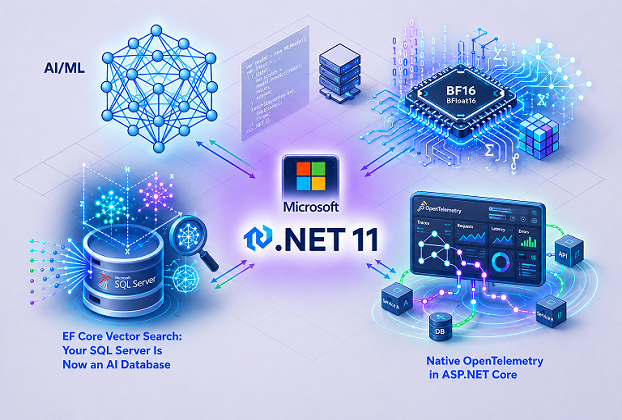
With Runtime Async and Union Types getting all the attention, three other .NET 11 additions have been flying under the radar. They don’t have the same dramatic origin story as a long-requested language feature, and they don’t generate GitHub debates about syntax. But in practice, they are the kind of changes that quietly make a developer’s daily life — and their application’s performance — meaningfully better. The three features we’re talking about are: a brand-new BFloat16 numeric type for AI and machine learning work, native OpenTelemetry support baked directly into ASP.NET Core, and EF Core’s Vector Search for SQL Server. Let’s dig into each one.
1. Native BFloat16 Type: .NET Finally Speaks AI’s Native Language
If you’ve spent any time working with AI models — or even just reading about how they’re trained — you’ve probably come across the term “floating-point precision.” In simple terms, when a computer works with numbers like 3.14 or 0.0001, it has to decide how many digits of precision to keep. Keeping more digits means more accuracy but also more memory and slower calculations. This trade-off is at the heart of modern AI hardware design. For years, the Python ecosystem — via PyTorch and TensorFlow — has had built-in support for a special numeric format called BFloat16 (also written as BF16 or “Brain Float 16”). Until .NET 11, C# developers had no equivalent. That changes with Preview 1, released on February 10, 2026.
BFloat16 was originally developed by Google Brain, the AI research group inside Google, as a format specifically tuned for machine learning workloads. What makes it special is how it balances range and precision. A regular 32-bit float (called float or float32) uses 24 bits to represent how precise the number is. BFloat16 uses only 7 bits for that precision — but it keeps the same 8-bit exponent as a float32. The practical result is that BFloat16 can handle numbers across roughly the same enormous range as a regular float (from about 10⁻³⁸ to 3×10³⁸), while using only half the memory — 2 bytes instead of 4. To put it plainly: it’s like a compressed version of a float that’s still wide enough to handle the huge value ranges that neural network weights typically fall into, while being compact enough to process in large batches.
Why does this matter for .NET developers? Because until now, if you wanted to work with BFloat16 in a .NET application, you were on your own — cobbling together workarounds or relying on wrappers around native libraries. In .NET 11, the BFloat16 struct lives natively in System.Numerics, the same namespace that houses other numeric types. It supports all the standard arithmetic operations, integrates with the generic math interfaces introduced in earlier .NET versions, and even works with BitConverter for serialization scenarios. (AI pipelines in brief: an AI pipeline is a sequence of steps that takes raw data, processes it through one or more AI models, and produces an output — for example, taking a user’s search query, converting it into a set of numbers, passing those numbers through a neural network, and returning a ranked list of results. BFloat16 speeds up the numeric steps inside this sequence.)
The hardware support behind BFloat16 is already widespread. Intel Xeon processors support it through AVX-512 BF16 extensions. AMD Zen and Instinct chips support it. NVIDIA GPUs support it. Google Cloud TPUs are built around it. Apple’s M2 chip and all chips from the A15 onward support it natively. AWS Inferentia and Trainium — Amazon’s AI chips — are BFloat16-native. What this means is that when your .NET 11 application uses BFloat16, on supported hardware the calculations can be offloaded to dedicated silicon, potentially doubling the number of operations your code can perform in the same time with the same memory budget. This is the kind of advantage that Python’s AI ecosystem has enjoyed for years via PyTorch and TensorFlow, both of which have deep BFloat16 support. Now .NET is on the same page.
The practical impact shows up most clearly in two scenarios. The first is inference workloads — when you’re running a trained model to make predictions in real time, for example in a recommendation system or a chatbot. Using BFloat16 instead of float32 can roughly double the number of model weights that fit in GPU memory, which means larger models or larger batches on the same hardware. The second scenario is custom ML pipelines built with ML.NET, Microsoft’s machine learning library for .NET. (ML.NET in brief: ML.NET is Microsoft’s open-source machine learning framework for .NET developers, allowing you to train and deploy models directly in C# without switching to Python. It supports tasks like classification, regression, recommendation, and more.) With BFloat16 available as a first-class type, ML.NET and other .NET-based ML tools can start adopting it natively for faster, leaner inference.
How does this compare with the competition? Java doesn’t have a built-in BFloat16 type, though there’s discussion in Project Valhalla about adding low-precision numeric types. Go and Rust both lack native BFloat16 as of mid-2026, relying on external crates or packages. Python has had it since PyTorch 1.7 (released 2020) and TensorFlow 2.x. .NET 11 is playing catch-up, but doing so in a way that integrates cleanly into the existing numeric type system rather than as a bolt-on. One developer on the .NET Blog’s Preview 1 announcement thread noted: “BFloat16 in BitConverter is relevant for ML inference pipelines that work with 16-bit brain float” — a small comment that undersells how significant this addition is for .NET’s credibility as an AI-ready platform.
Looking ahead, the arrival of BFloat16 in the BCL (Base Class Library) is just the starting point. Once the type is standard, higher-level frameworks like ML.NET, Semantic Kernel, and ONNX Runtime for .NET can begin adopting it for their internal computations. (Semantic Kernel in brief: Semantic Kernel is Microsoft’s open-source SDK for building AI-powered applications in .NET, Python, and Java. It connects large language models like OpenAI’s GPT models with your code, tools, and data, making it easier to build AI agents and intelligent workflows.) Microsoft has explicitly described .NET 11 as “built for the AI era” — BFloat16 is one of the concrete, low-level building blocks that gives that statement real meaning beyond marketing language.
2. Native OpenTelemetry in ASP.NET Core: Stop Bolting On What Should Already Be There
If you’ve ever had to debug a slow API call in a production system built from multiple connected services, you know the pain: you know something is wrong, but you can’t see where the delay is happening. Is it the database? The external API call? The serialization step? Without proper observability tooling, you’re guessing. This is the problem that OpenTelemetry was built to solve. And in .NET 11 Preview 2, released on March 10, 2026, Microsoft took a significant step by baking OpenTelemetry tracing support directly into ASP.NET Core — no extra package required.
(OpenTelemetry in brief: OpenTelemetry — often shortened to OTel — is an open-source standard for collecting observability data from applications: specifically traces (the path of a request through your system), metrics (numbers like request counts and response times), and logs (text records of what happened). It’s maintained by the Cloud Native Computing Foundation (CNCF) and supported by virtually every major cloud provider and monitoring tool, from AWS and Azure to Datadog and Grafana. Before OpenTelemetry, every monitoring vendor had its own SDK, and switching providers meant rewriting your instrumentation code.)
Before .NET 11, setting up OpenTelemetry tracing in an ASP.NET Core application required installing and configuring the OpenTelemetry.Instrumentation.AspNetCore NuGet package as a separate step. That package would then inject itself into the HTTP pipeline and emit standard tracing attributes — things like the HTTP method used, the URL path, the response status code, and the server address — into the OpenTelemetry pipeline. It worked, but it was an extra dependency, an extra configuration step, and one more thing that could fall through the cracks on a busy team. As reported by InfoQ following the Preview 2 release: “The framework now adds OpenTelemetry semantic attributes directly to HTTP server activity, meaning developers no longer need the separate instrumentation library to collect standard tracing data.”
What exactly gets emitted automatically in .NET 11? When a request arrives at your ASP.NET Core application, the framework now automatically populates a set of standard attributes: http.request.method (GET, POST, etc.), url.path (the endpoint being called), http.response.status_code (200, 404, 500, etc.), and server.address (which host handled the request). These are the attributes defined by the OpenTelemetry semantic conventions specification, meaning your traces will look the same whether you’re sending them to Grafana, Jaeger, Azure Monitor, Datadog, or any other compatible backend. You don’t need to define them yourself, and you can’t accidentally spell them differently across different services.
To understand why this matters beyond saving a few minutes of setup time, think about how modern applications are actually built. A single user action — say, clicking “place order” on an e-commerce website — might touch a front-end service, an order service, a payment service, an inventory service, and a notification service. Each of those is a separate ASP.NET Core application, potentially running on separate servers or containers. In the past, if even one of those services hadn’t properly configured OpenTelemetry, you’d have a gap in your trace — a section of the request’s journey you simply couldn’t see. With .NET 11, every ASP.NET Core service emits basic tracing data by default, creating a consistent baseline across the whole system without any manual effort. This is what proper observability looks like: not an opt-in luxury but a built-in expectation.
In .NET 11, OpenTelemetry also replaces Application Insights as the default telemetry provider for the .NET CLI itself. This is a quiet but meaningful signal: Microsoft is standardising on the open, vendor-neutral OTel standard across its own tooling, not just in application frameworks. Additionally, the Aspire framework — Microsoft’s toolkit for building distributed applications, now at version 13.1 — uses OpenTelemetry as its telemetry layer, and .NET 11 further tightens that integration. Teams using .NET Aspire alongside .NET 11 get a coherent, out-of-the-box observability story with virtually no configuration. Metrics from MemoryCache now flow through OpenTelemetry automatically as well, giving teams visibility into caching behaviour without writing custom instrumentation.
How does this compare to other platforms? Java has had strong OpenTelemetry support through Spring Boot’s Actuator and Micrometer libraries for years, with automatic instrumentation available since 2021. Go’s standard library ecosystem adopted OTel conventions early. Python’s Django and FastAPI frameworks have had third-party OTel integrations for some time. .NET has historically lagged behind in making observability frictionless, partly because Application Insights — Microsoft’s proprietary solution — was the preferred path. .NET 11’s native OTel integration is a meaningful course correction, aligning .NET with the broader industry standard rather than pushing teams toward a vendor-specific path.
For production teams, the practical benefit is clear: you can now stand up a new ASP.NET Core 11 service, subscribe to the Microsoft.AspNetCore activity source, and standard tracing data will flow into your monitoring backend automatically. No searching NuGet for the right package version. No forgetting to call AddAspNetCoreInstrumentation() during startup. No spending an afternoon debugging why one service’s traces look different from another. In a microservices architecture with ten, twenty, or fifty services, having this be a default rather than an opt-in can be the difference between having actual visibility into your system and flying blind when things go wrong in production at 2am.
Looking forward, the full native embedding of OpenTelemetry into ASP.NET Core is expected to deepen further as .NET 11 moves through its remaining previews and toward general availability in November 2026. The groundwork being laid here also positions .NET apps well for the growing “agentic AI” patterns Microsoft discussed at Microsoft Build 2026 (held in early June 2026), where observability of AI agent workflows — tracking which agent called which tool, and how long each step took — becomes just as important as traditional HTTP request tracing.
3. EF Core Vector Search: Your SQL Server Is Now an AI Database
Here’s a scenario more and more development teams are running into: the business wants to add “smart search” to the application — the kind that understands that a user searching for “lightweight laptop for travel” should also see results for “ultrabook” or “portable notebook,” even if those exact words weren’t typed. This kind of search is called semantic search or vector search, and until recently, doing it in a .NET application required either adding a completely separate database (like Pinecone, Qdrant, or pgvector on PostgreSQL) or writing complex raw SQL. Entity Framework Core 11, shipping with .NET 11 in November 2026, changes that picture entirely for teams already running SQL Server 2025.
To understand what vector search is, it helps to know a little about how AI models represent text. When a language model reads a sentence, it converts it into a list of numbers called an embedding. These numbers capture the “meaning” of the text in a form that mathematics can work with. Two sentences with similar meanings will have embeddings that are numerically close to each other; two sentences about completely different topics will have embeddings that are far apart. Vector search is the process of finding all the items in your database whose embeddings are “close” to the embedding of whatever the user searched for. Microsoft’s official documentation describes this plainly: “The SQL Server vector data type allows storing embeddings, which are representations of meaning that can be efficiently searched over for similarity, powering AI workloads such as semantic search and retrieval-augmented generation (RAG).”
A brief timeline helps put this in context. Vector search support first arrived in EF Core 10 (released November 2025), which introduced the EF.Functions.VectorDistance() function for running exact similarity calculations in LINQ queries. This was useful but slow at large scales — exact vector distance calculations scan every row in the table. EF Core 11 (shipping with .NET 11 in November 2026) takes the next step by adding support for approximate nearest-neighbor (ANN) search using SQL Server 2025’s DiskANN vector indexes, via a new VectorSearch() extension method and the WithApproximate() option. DiskANN is a high-performance ANN algorithm originally developed by Microsoft Research, and SQL Server 2025 is the first version of SQL Server to support it natively. The EF Core GitHub release notes for Preview 4 confirmed this: “Calling VectorSearch() returns rows ordered by vector distance, and adding WithApproximate() instructs SQL Server to use a vector index — translating to the WITH APPROXIMATE clause introduced in SQL Server 2025.”
What does the code actually look like? In EF Core 11, you declare a vector index in your model configuration:
modelBuilder.Entity<Blog>()
    .HasVectorIndex(b => b.Embedding, "cosine");
Then when you run a query, you use the new VectorSearch() method:
var results = await context.Blogs
    .VectorSearch(b => b.Embedding, queryEmbedding, "cosine")
    .OrderBy(r => r.Distance)
    .Take(10)
    .WithApproximate()
    .ToListAsync();
That’s it. No raw SQL, no stored procedures, no switching to a different database. The EF Core migration tooling also generates the CREATE VECTOR INDEX DDL for you automatically, so the index exists in your database the same way any other index does — managed, versioned, and reproducible. It’s worth noting an important change introduced in EF Core 11 Preview 3: vector properties are no longer loaded by default when you query an entity. Because vector embeddings are typically large (often 1,536 float values for a model like OpenAI’s text-embedding-ada-002), loading them on every query was unnecessarily expensive. In EF Core 11, you have to explicitly ask for the embedding if you need it. This is a breaking change from EF Core 10’s behaviour, and something to be aware of when upgrading.
For teams who’ve been using dedicated vector databases like Qdrant or Pinecone, the appeal here is significant: you can consolidate your AI search capabilities back into the SQL Server instance you’re already running, paying for, and maintaining. This eliminates an entire category of infrastructure complexity. For smaller teams or startups, it removes a barrier to entry entirely — you don’t need to spin up a new service or learn a new query language just to add smart search to your app. As one developer put it in a published walkthrough from April 2026: “If you previously offloaded vector search to a dedicated database (Qdrant, Pinecone, pgvector), this brings it back into the SQL Server you are already running, with EF Core managing the schema.”
EF Core 11 also adds support for hybrid search — combining semantic vector search with traditional full-text keyword search in a single LINQ query, using a ranking technique called Reciprocal Rank Fusion. This is the approach that most real-world “smart search” systems use: vector similarity finds semantically relevant results, keyword matching finds exact term matches, and the hybrid approach gives you the best of both. New methods like FreeTextTable() and ContainsTable() are introduced in EF Core 11 to enable ranked full-text search results alongside vector results. This means you can build a production-quality AI-powered search feature entirely within EF Core and SQL Server, without leaving the familiar C# and LINQ world you already know.
How does this compare to the competition? PostgreSQL’s pgvector extension has been available since 2021 and supports approximate search with HNSW and IVFFlat indexes. MongoDB Atlas added native vector search in 2023. MySQL and MariaDB don’t have native vector support as of mid-2026. SQL Server’s approach with DiskANN is newer but technically competitive, and having it integrated directly into EF Core is a genuine advantage for the .NET ecosystem over, say, Java’s JDBC-based approaches where vector search typically requires raw SQL or external libraries.
The future prospects for this feature are promising. As Retrieval-Augmented Generation (RAG) — a technique where an AI model retrieves relevant documents from a database before generating a response — becomes increasingly common in enterprise software, having vector search natively in SQL Server and EF Core positions .NET developers to build production-ready AI features without fundamentally changing their data architecture. Microsoft’s direction, as outlined at Microsoft Build 2026, is clearly toward making .NET the natural platform for enterprise AI applications — and EF Core Vector Search is one of the most concrete, developer-friendly steps in that direction.
Runtime Async and C# Union Types deserve their headlines — they’re the result of years of community requests and some genuinely impressive engineering work. But if you’re a developer trying to figure out what .NET 11 actually means for the applications you build every day, the three features covered in this article may have more immediate, practical impact on your work. BFloat16 opens the door to serious AI and ML work inside the .NET ecosystem. Native OpenTelemetry in ASP.NET Core means your applications will have proper visibility built in rather than bolted on. And EF Core Vector Search means you can add intelligent semantic search to your existing SQL Server data without adding new infrastructure. November 2026 can’t come soon enough.
Frequently Asked Questions (FAQs)
Can I use BFloat16 in a regular .NET 11 C# project, or is it only for dedicated AI/ML frameworks?
You can use it in any .NET 11 project. The BFloat16 struct lives in System.Numerics alongside other built-in numeric types, so it works like any standard type — arithmetic operations, generic math interfaces, and BitConverter serialization are all supported out of the box. You don’t need ML.NET or any external library just to use the type itself.
Does EF Core Vector Search in .NET 11 require migrating to a new database, or does it work with an existing SQL Server instance?
It works with SQL Server 2025 — no separate vector database needed. If you’re already running SQL Server 2025, you can add a vector index to an existing table using EF Core migrations just like any other index, and query it using the new VectorSearch() LINQ method. The schema is managed and versioned the same way your existing EF Core models are.
What is the core objective of .NET 11 that distinguishes it from its predecessor versions?
Unlike some previous releases that focused on introducing visible language features or new frameworks, .NET 11 places much greater emphasis on improving the underlying runtime itself. Many of its most significant enhancements happen behind the scenes, making applications execute faster, consume fewer resources, and become easier to debug without requiring developers to rewrite existing code.
This shift makes .NET 11 a particularly developer-friendly release. Features such as Runtime Async, smarter JIT optimizations, enhanced compression libraries, improved JSON serialization, and upcoming C# Union Types collectively aim to reduce boilerplate code while increasing performance and maintainability. Instead of adding flashy APIs alone, .NET 11 focuses on making everyday development smoother and production applications more efficient.
What is Runtime Async? Is it something similar to the asynchronous, non-blocking runtime environment provided by Node.js?
Not exactly. Although both technologies improve asynchronous programming, they solve different problems. Node.js achieves high scalability through an event-driven, single-threaded architecture with a non-blocking event loop. .NET, on the other hand, already supports asynchronous programming through the async/await model and a highly optimized thread pool. Runtime Async doesn’t replace that model—it improves how it is implemented internally.
Traditionally, every async method in C# is transformed by the compiler into a state machine, which introduces additional allocations and often produces confusing stack traces during debugging. Runtime Async moves much of that machinery into the runtime itself. The result is lower overhead, cleaner call stacks, improved diagnostics, and potentially better performance, while developers continue writing the same familiar async/await code.
What is the reason for introducing Union Types in C#, and what do they facilitate?
Union Types address a long-standing limitation in C#. Today, developers often rely on inheritance, interfaces, nullable values, tuples, or third-party libraries to represent a value that can legitimately be one of several distinct types. While these workarounds are functional, they frequently make APIs harder to understand and maintain.
Union Types provide a type-safe way to express exactly that intent. A method can return one of several well-defined result types without sacrificing compile-time checking or readability. This makes it easier to model operations such as successful results, validation failures, or different message types while reducing unnecessary class hierarchies and complex conditional logic. Although the runtime support is already appearing in .NET 11, the language integration is still evolving as part of C# 15.
What AI-specific features have been added or updated in .NET 11?
Unlike some modern platforms, .NET 11 does not introduce a dedicated set of AI-exclusive language features. Instead, Microsoft continues improving the platform so AI-powered applications can run more efficiently. Faster runtime execution, improved memory management, enhanced SIMD and hardware intrinsic support, and better numerical libraries all contribute to higher performance for machine learning and inference workloads.
Developers building AI applications will also benefit from ongoing improvements across the .NET ecosystem, including better interoperability with ONNX Runtime, Microsoft.Extensions.AI, Semantic Kernel, ML.NET, and cloud-based AI services. In other words, .NET 11 is less about introducing new AI syntax and more about providing a faster, cleaner, and more capable foundation for modern AI-enabled applications.
Should developers upgrade to .NET 11 immediately?
That depends on the type of application you’re building. If you’re starting a new project or enjoy experimenting with the latest platform capabilities, .NET 11 offers plenty of compelling improvements worth exploring. However, as long as it remains in preview, production workloads should generally continue targeting the latest stable release unless you’re comfortable testing preview software.
Once .NET 11 reaches General Availability (GA), it will become an attractive upgrade for developers seeking improved performance, better debugging experiences, cleaner asynchronous execution, and the latest C# language capabilities with relatively little migration effort.
Will existing .NET applications require major code changes to run on .NET 11?
For most applications, probably not. One of the strengths of the .NET ecosystem has always been its commitment to backward compatibility. The majority of the improvements in .NET 11 occur within the runtime, libraries, JIT compiler, and SDK, allowing many applications to benefit simply by targeting the newer framework.
As with every major release, developers should still review the official list of breaking changes, especially if their applications depend on older APIs, platform-specific behavior, or unsupported packages. In most cases, however, migrating to .NET 11 is expected to be an incremental upgrade rather than a complete rewrite.
All features mentioned in this article are currently in preview and subject to change before the final release of .NET 11. Preview builds should not be used in production applications. You can download the .NET 11 Preview SDK and follow the latest updates on the official Microsoft .NET Blog and Microsoft Learn.
You may also be interested in reading these articles:
Windows 12: Is the “AI-First” Operating System Finally Here?
.NET 10 and Beyond: What the Future Holds for Developers
Software Architecture Vs Design Enigma